Features and Benefits
User Profile Migration
Quickly and easily migrate user profile data and settings between desktops, operating systems and delivery mechanisms. Users can be migrated from a physical to a virtual environment without having to re-create personalization settings.
Accelerate Microsoft Windows 7 Migration
AppSense Environment Manager can help migrate users to Microsoft Windows 7 from previous Windows versions. All aspects of the user are extracted from an existing OS and application set and re-applied to the upgraded Windows 7 desktop, providing a seamless experience to the user.
Application-Level Personalization
Roaming profiles are eliminated and instead, personalization settings are managed and streamed at the application level, reducing profile size and enabling independent management of user profile data on a per application basis. Applications can now be upgraded or swapped out with no impact to the user experience since the application profile data is managed separately from the application itself.
Personalization Streaming
To reduce network traffic, logon times and profile corruption, AppSense Environment Manager streams user settings on-demand in response to user actions. Policy and personalization is applied to the environment as applications and operating system features are used.
Cross Operating System Platform Support
To enable the gradual implementation of Windows 7, or to allow users to roam between operating system versions, AppSense Environment Manager virtualizes and separates the user from the OS and will the configure and personalization the desktop as the user logs on.
Cross Delivery Mechanism Support
By applying user specific settings to any desktop or application regardless of how it is delivered, AppSense Environment Manager enables organizations to benefit from using multiple desktop and application delivery technologies to deliver desktops at lowest possible cost.
Configure and Personalization Microsoft App-V Applications
Reduce application packaging complexity and costs by using a single standard packaged application and using AppSense Environment Manager to then configure and personalize the application based on user and device conditions and rules.
Offline Mode
Both policy and personalization data is accessible to the user in a disconnected offline state. All desktop and application level personalization settings made in a SBC or Virtual Desktop environment are available locally when the user is off-line. The user now has a fully portable personality, which is re-synchronized with any new latest settings made offline when the user comes back online.
Personalization Rollback
Reduce support costs and time to repair damaged profiles by taking scheduled snapshots of the user settings on a per application basis and if required, ‘roll back’ the settings to a previous known good snapshot for a user on a per application basis.
Self Healing
To reduce support costs and improve the user experience, AppSense Environment Manager can automatically self heal files, registry items, services and processes, in real-time, to prevent user introduced changes or actions from compromising system integrity.
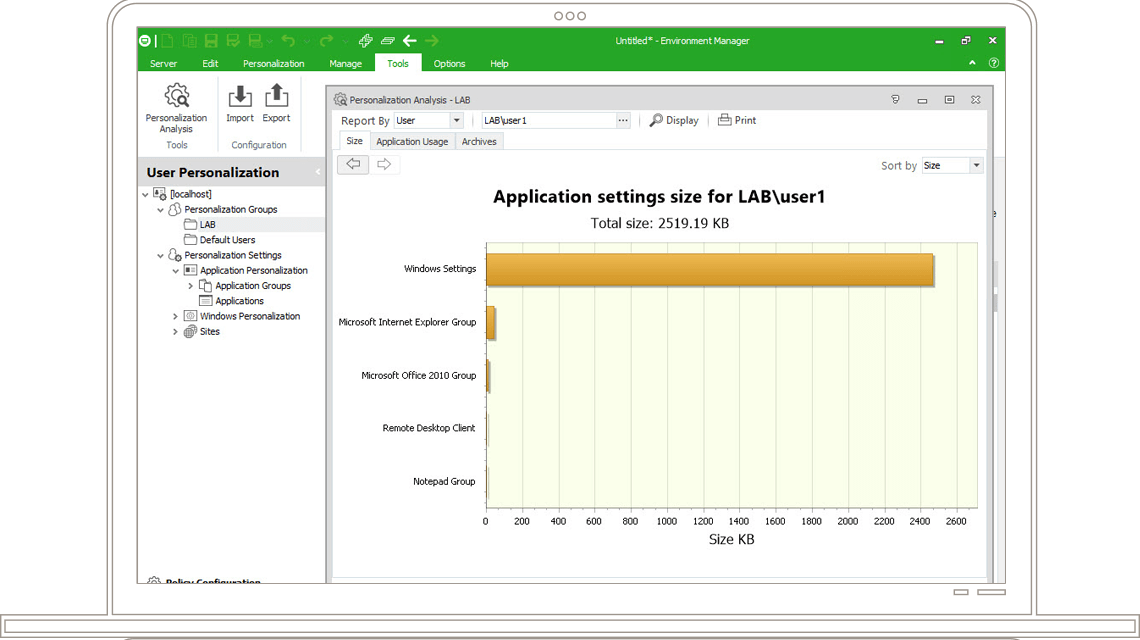
Personalization Analysis
A rich and interactive set of reports and graphs provides visibility into personalization activity. Personalization analysis can identify trends in personalization use, enabling extraneous data to be omitted from the user profile where necessary.
Triggers, Conditions and Actions
Define events and triggers that are used to implement business policies and actions. By easily manipulating these triggers, conditions and actions an administrator can quickly implement business policies which can be shared and utilized across operating system boundaries and different application delivery mechanisms.
AppSense Configuration Templates
To simplify desktop management, AppSense Environment Manager is able to import pre-built configuration files. A selection of templates, such as ‘Default Outlook Profile’, ‘MS Office feature lockdown’ and ‘Control Panel Item Removal’ are available from www.myappsense.com.
Click here to view AppSense Environment Manager video demos
Click here to visit the AppSense Environment Manager hompage